- JavaScript 41.4%
- TypeScript 37.9%
- CSS 19.3%
- HTML 1.4%
| Filename | Latest commit message | Latest commit date |
|---|---|---|
|
|
||
| .github | ||
| designs | ||
| img | ||
| manifests | ||
| public | ||
| scripts | ||
| src | ||
| webpack | ||
| .babelrc | ||
| .gitignore | ||
| LICENSE | ||
| package.json | ||
| README.md | ||
| tsconfig.json | ||
| yarn.lock | ||

Bot finder
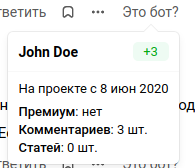
Web extension that shows account creation date and other info for users of vc.ru, TJ and DTF in the comments.
Website • Chrome Web Store • Firefox Browser Add-ons
Getting started
Navigate to the project directory and install the dependencies.
$ yarn
To build the extension for Chrome and Opera, run
$ yarn build-webkit && yarn archive
To build the extension for Safari
You need to have XCode installed on your Mac.
Follow instructions for Chrome, then follow these instructions from Apple:
https://developer.apple.com/documentation/safariservices/safari_web_extensions/converting_a_web_extension_for_safari. The command you need to use is probably going to look like this:
xcrun safari-web-extension-converter /Volumes/Experiments/bot-finder/dist/
If you don't have developer certificate, you'll also need to follow these instructions: https://developer.apple.com/documentation/safariservices/safari_app_extensions/building_a_safari_app_extension#2957926 (see "Enable Your App Extension in Safari").
To build the extension for Firefox, run
$ yarn build-firefox && yarn archive
After the project has been built, a directories named dist and build (with build archive) have been created.